A floor framing plan coordinates the structural members and support assumptions for one floor level: joist fields, beams, floor openings, bearing lines, columns, dimensions, and references to schedules or details. This guide covers the layout decisions and checks behind that drawing.
The output you create in the browser is preliminary. A construction framing plan also needs project-specific member sizes, connections, design criteria, details, and the approval required by the jurisdiction adopting your building code.
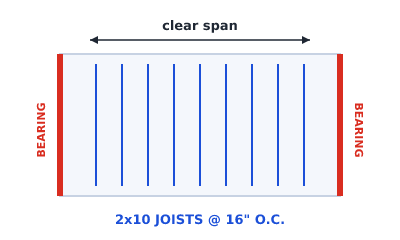 2x10 joists spanning the short dimension onto two bearing walls at 16 inches on center
What a floor framing plan contains
- Joists, the repeating members spanning the floor, shown with their direction and on-center spacing, called out as something like
2x10 JOISTS @ 16" O.C. - Beams and headers, larger members gathering joist loads and framing openings.
- Support lines, the walls or beams assumed to carry member ends, emphasized for coordination (drawn in red for the app's initial wall assumptions).
- Openings, such as stairwells, duct chases, and access hatches, framed by headers and trimmer joists.
- Grid and columns, on larger layouts, setting-out lines with columns at intersections.
- Annotations, including dimensions, member callouts, schedule references, and a title block.
The visual conventions for all of these are in framing plan symbols.
The layout decisions, in order
A useful preliminary plan records each decision and the information still needing verification:
| Decision | Useful starting information | What must be checked |
|---|---|---|
| Joist direction | Footprint, likely support lines, openings | Actual supports, load path, span tables, mechanical runs |
| Spacing | Intended member system and subfloor | Span table, loads, deflection, local rules |
| Beams and columns | Long spans, changes of direction, transfer points | Loads, sizes, bearing, connections, support below |
| Floor openings | Stair, shaft, hatch, and penetration locations | Headers, trimmer joists, doubled members, connection details |
| Annotation | Level, dimensions, member IDs, assumptions | Current schedules, notes, revisions, drawing status |
1. Joist direction
The shorter clear span is a sensible first option because it reduces the distance each member crosses. It is not a design rule. Existing support, stairs, mechanical zones, cantilevers, floor-depth limits, and the selected joist system may favor another direction. Direction identifies the ends of that joist field. It does not by itself prove which other walls are non-bearing.
2. On-center spacing
On-center spacing is measured from the centerline of one joist to the centerline of the next, not the clear gap between them. US framing uses standard spacings of 12, 16, 19.2, and 24 inches on center, with 16" o.c. the common default. For the same member, span, and loading, closer spacing spreads load across more joists, while wider spacing gives each joist a larger tributary width. Which spacings are actually available, and what each can carry, comes from the applicable span table or manufacturer information, not from a universal list. The full treatment is in floor joist spacing explained.
3. Bearing walls
Mark the walls or beams assumed to support each joist field, then trace how those reactions continue through the level below. Also check for loads arriving from above. A wall running parallel to the joists may still carry other structure. See load-bearing walls in a floor framing plan.
4. Openings
Mark stairwells, shafts, hatches, and significant floor penetrations early. These interrupt the joist field and need designed framing around the hole, typically a header across the opening with doubled trimmer joists at its sides. Doors and windows may be shown for coordination, but a wall opening header is a separate matter from framing a hole through the floor.
5. Drawing status and unresolved items
Label the level, units, scale or NTS, revision, and preliminary status. Make support assumptions and unresolved items visible instead of presenting them as settled design. That gives the reviewer a useful checklist rather than a drawing that merely looks finished.
How to draft and export one
The preliminary workflow, end to end, is covered step by step in how to draft a preliminary floor framing plan. In short: footprint, joist direction, spacing, bearing walls, openings, grid, annotate, export. For output, choose PDF or PNG for review and DXF for CAD. The formats are compared in framing plan file formats and detailed in exporting to DXF.
Floor framing plans by project type
- New builds, coordinating structure with the architectural layout from the start. See framing plans for residential new builds.
- Multi-story, where loads stack between levels. See second floor framing plans and two-story homes.
- Additions, tying into existing structure. See framing plan for a home addition.
How it differs from a roof framing plan
A floor framing plan frames a level you walk on. A roof framing plan frames the roof above, usually with rafters or trusses and a slope. The principles rhyme, but the members differ. See the roof framing plan guide.
Keep it preliminary
A floor framing plan you draft in the app is a preliminary layout, a coordination and communication aid. Member capacity, vibration and deflection, concentrated loads, fire and durability requirements, bearing, connections, lateral stability, and code compliance all sit outside that preliminary geometry and need the project-specific structural review required locally.
Try it
Draft a floor framing plan in your browser, with joists, beams, bearing walls, openings, and dimensions, then export it. Open the framing studio to start, or begin from a template.