On a floor framing plan, a bearing wall is part of a load path: floor members, beams, roof framing, or structure above deliver load to it, and it transfers that load to support below. Joist direction is a useful clue to the supports for one joist field, but it is not enough to classify every wall. The drawing's notes, sections, details, and engineering information must agree.
New to the drawing itself? Start with the comprehensive floor framing plan guide.
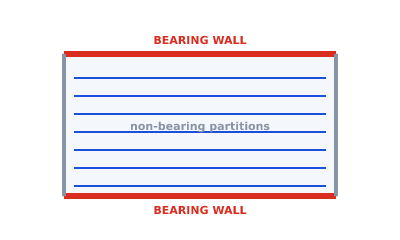 Bearing walls in red at the ends of the joist run; partitions in gray
What "load-bearing" means here
A load-bearing wall carries structural load from above to a foundation, beam, wall, or other verified support below. On a floor framing plan, it may support joist ends, a beam, a different framing bay, or loads from another level.
Do not treat a wall that appears non-bearing on one plan as safe to alter. It may have a role that is not visible on that sheet, including support for the roof or floor above, lateral bracing, fire separation, or building services. Alterations need project-specific investigation and professional review.
Why joist direction is a clue, not proof
For a simple, single-span joist field, the joist ends land on supporting walls or beams. Those end supports carry that field's reaction. A wall running parallel to those joists does not normally support their ends, but it can still be bearing for another reason.
Check at least four sources before classifying a wall:
- Where the joists, beams, rafters, or trusses actually end or bear.
- What lands on the wall from the level or roof above.
- Whether support continues through the level below.
- The drawing legend, tags, sections, schedules, and notes.
This is why changing joist direction changes the app's suggested support assumption, not the verified structural role of every wall. See how to read a floor framing plan for the full reading sequence.
How bearing walls are marked
Drawing conventions vary between offices and standards, but the goal is always the same: make the structural walls unmistakable.
- A heavier line weight than partitions.
- A hatch or fill along the wall.
- A note or tag such as "bearing".
- A distinct color on screen.
In Framing Plan, walls assumed to support the generated joist field are drawn in red. The initial highlight follows the chosen span direction, and you can override it. Red is a preliminary layout convention inside the app; it is not an automatic determination that the real wall and its support below have adequate capacity.
Interior and overridden bearing walls
Real layouts are rarely a single clean span. Common cases where you override the defaults:
- Center bearing line: joists may be designed to bear, lap, or continue over an interior wall or beam, shortening individual spans.
- Beam transfer: a beam gathers joist loads and lands on a particular wall or column, making that point load-bearing.
- Offsets and L-shapes: different parts of the floor span different directions, so the bearing pattern is not uniform.
- Loads from above: a parallel wall may support a wall on the story above, a roof member, or a point load even when it does not support the joists shown on the current plan.
Marking these correctly on the preliminary plan saves confusion later and gives the engineer a clear starting point.
A note on safety
Identifying and sizing bearing walls for construction requires project-specific structural review. A preliminary framing plan is a layout and communication aid: it records support assumptions for discussion, while the final load paths, wall capacity, foundations, beams, and connections must be verified by the qualified structural professional required in your jurisdiction.
Try it
Set a joist direction, inspect the red support assumptions, and edit them to match the information you have. Open the framing studio to prepare a preliminary layout, then have the assumptions checked before anyone relies on them for construction.